Quick answer (updated November 2026): What is SSO login? SSO (single sign-on) lets you log in once with one account and then use many apps without signing in again. Everyday examples are “Sign in with Google“, a college portal that opens your email, LMS and library together, and a company’s Microsoft or Okta login. Behind the scenes, an identity provider (such as Google, Microsoft Entra ID or Okta) confirms who you are, and each app trusts that confirmation. The common standards are SAML (older, popular with enterprises), OAuth 2.0 (for permissions) and OpenID Connect (a login layer built on OAuth). SSO means fewer passwords, but that one account must be protected with two-factor authentication or a passkey.
“SSO login” searches have doubled this year — mostly students and employees trying to reach a portal that suddenly redirects them to a different login page. This guide explains SSO in simple words, how it works, its pros and cons, and what to do when SSO login fails.
What is SSO in simple words?
Imagine a college ID card that opens the library, hostel, lab and canteen. You show it once at the main gate, and every building trusts the gate’s check. SSO works the same way online: one trusted login unlocks many services.
- Identity provider (IdP): the “main gate” that checks your password and second factor — for example Google, Microsoft Entra ID or Okta.
- Service provider (SP) / relying party: each app that trusts the IdP — your email, LMS, HR portal, Slack, Canva and so on.
How SSO works (step by step)
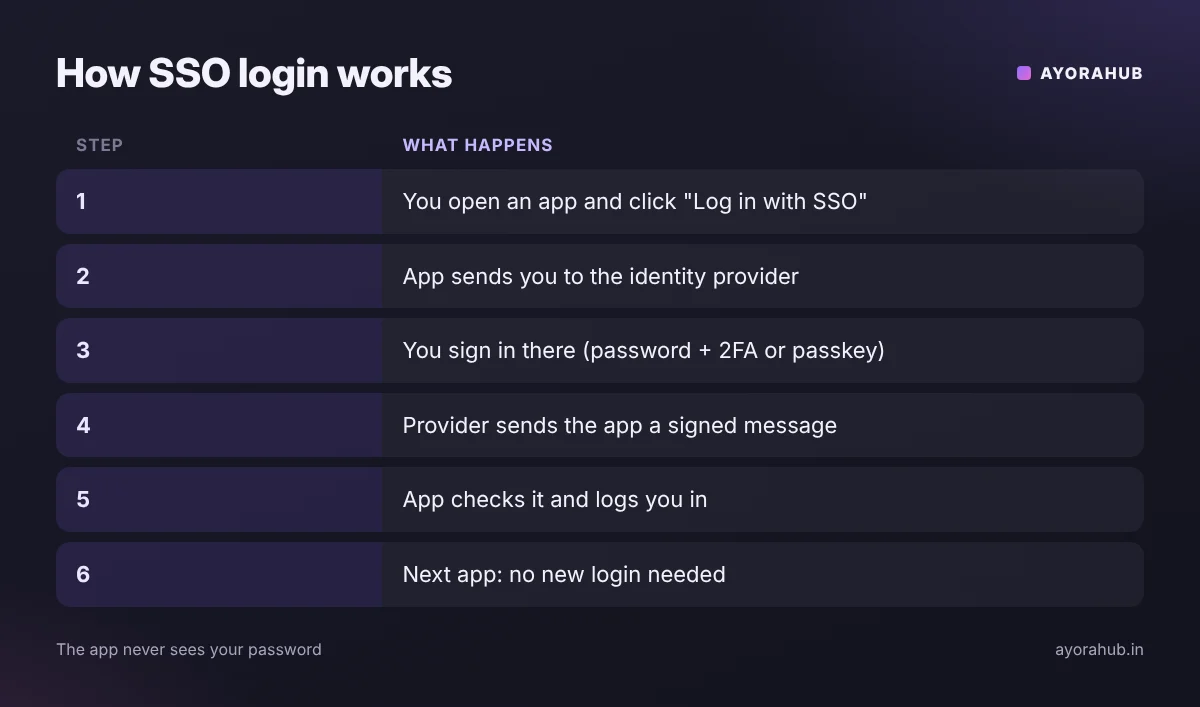
- You open an app (say, your college LMS) and click Log in with SSO.
- The app redirects you to the identity provider’s login page.
- You sign in there — password plus a second factor, or a passkey.
- The identity provider sends the app a signed message (a SAML assertion or an OpenID Connect ID token) saying who you are.
- The app checks the signature and logs you in — your password never reaches the app.
- When you open the next app, the identity provider already has your session, so you get in with no extra login.
SAML vs OAuth vs OpenID Connect
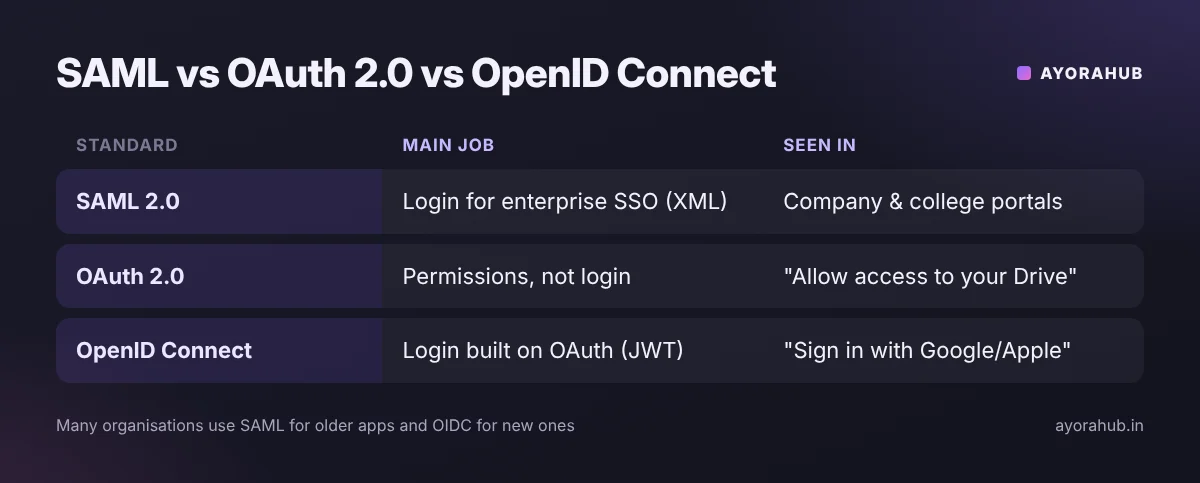
| Standard | Main job | Format | Where you see it |
|---|---|---|---|
| SAML 2.0 | Authentication (who you are) for enterprise SSO | XML assertions | Company and university portals, older business apps |
| OAuth 2.0 | Authorisation (what an app may access), not login by itself | Access tokens | “Allow this app to view your Google Drive files” |
| OpenID Connect (OIDC) | Login built on top of OAuth 2.0 | JSON Web Token (ID token) | “Sign in with Google/Microsoft/Apple”, modern web and mobile apps |
Many organisations run both: SAML for older enterprise systems and OIDC for new apps.
Advantages and disadvantages of SSO
| Advantages | Disadvantages |
|---|---|
| One password to remember — fewer weak or reused passwords | If that account is stolen, many apps are exposed |
| Faster logins; fewer password-reset requests | If the identity provider is down, you cannot reach any app |
| IT can switch off all access at once when someone leaves | Setup is more complex for organisations |
| Apps never see your password | Phishing pages copy SSO login screens |
How to keep your SSO account safe
- Turn on two-step verification, or better, use a passkey where offered — passkeys resist phishing.
- Check the address bar before typing your password: it should be your organisation’s or provider’s real domain (for example accounts.google.com or login.microsoftonline.com).
- Never approve a login prompt you did not start (“MFA fatigue” attacks spam you with approval requests).
- Log out on shared computers — signing out of one app may not end your SSO session.
- Review “third-party apps with account access” in your Google or Microsoft account settings and remove ones you don’t use.
SSO login not working? Try these fixes
- Use the right account: sign out of personal Google/Microsoft accounts, or use a private window, then log in with your college or work account.
- Clear cookies for the portal and the identity provider.
- Allow pop-ups and third-party cookies for the portal if it asks.
- Check the device time — wrong date/time can make signed tokens look invalid.
- Turn off the VPN or try another network; some organisations block unknown locations.
- Still stuck? Contact your college or company IT help desk — only they can reset SSO access. Never share your password or OTP with anyone who calls you.
Frequently Asked Questions
What is SSO login?
A login method where you sign in once with a trusted account (such as Google, Microsoft or your organisation’s login) and then access many apps without signing in again.
What is the full form of SSO?
Single sign-on.
Is “Sign in with Google” SSO?
Yes, it is a consumer form of SSO, usually built on OpenID Connect.
Is SSO safe?
It is safe when the main account uses strong two-factor authentication or a passkey. It reduces password reuse but concentrates risk in one account.
What is the difference between SSO and two-factor authentication?
SSO is about logging in once for many apps; two-factor authentication is about proving it’s you with a second check. Good setups use both.
Why does my college portal redirect to Microsoft or Google?
Your college uses that company as its identity provider. Sign in with your college-issued account there.
Conclusion
SSO makes life simpler — one secure login instead of a dozen passwords — as long as you protect that one account well. Related guides: what CAPTCHA is and how to spot fake verification pages, GitHub for beginners and Google AI plans in India.
How we researched this
We used identity-standard explainers from the OpenID Foundation, Cloudflare, Okta and Auth0, and Microsoft’s identity documentation, checked in November 2026. Login screens differ by organisation; follow your own IT team’s instructions.