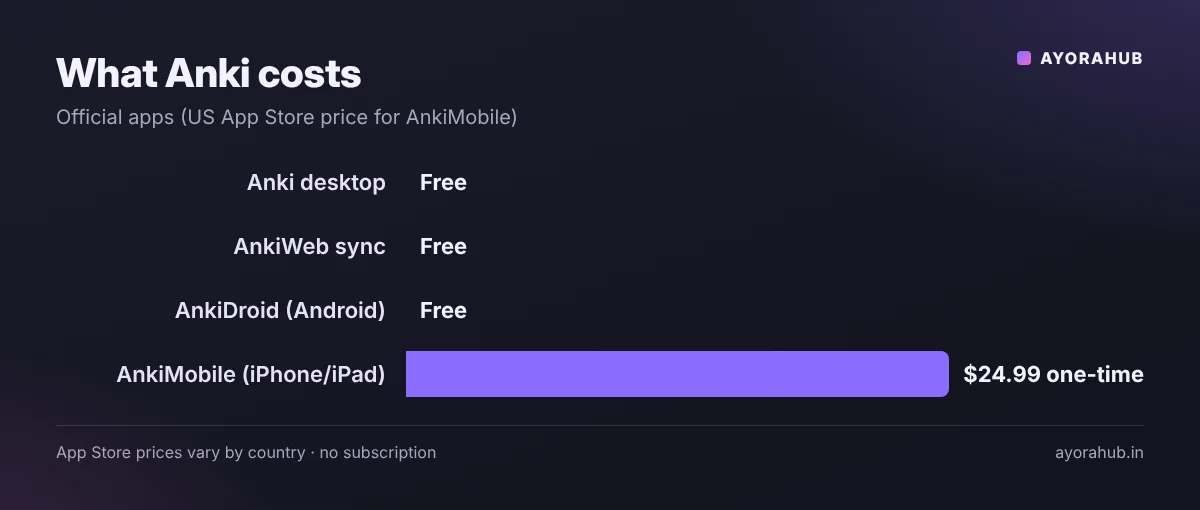
Quick answer (updated November 2026): Anki is a flashcard app that uses spaced repetition: it shows each card just before you are likely to forget it, so you remember more while studying less. The desktop app (Windows, Mac, Linux), AnkiWeb and the Android app AnkiDroid are free. The official iPhone/iPad app, AnkiMobile, is a one-time purchase (US $24.99 on the US App Store; prices vary by country), and sync stays free. Modern Anki includes the FSRS scheduler, a smarter alternative to the old SM-2 algorithm. How to use Anki: install it, create a free AnkiWeb account to sync, make short question-answer cards, and review every day.
Anki searches are up 30% this year, driven by students preparing for exams and learning languages. This guide shows how to use Anki properly — setup, making good cards, FSRS settings and a daily routine — for exams like NEET, JEE, UPSC, board exams and university courses.
What is Anki and how does spaced repetition work?
When you learn something, you start forgetting it within days. Reviewing at increasing intervals — 1 day, a few days, a week, a month — makes memories last much longer. Anki automates this. After each card you rate your answer (Again, Hard, Good, Easy), and Anki schedules the next review.
Two parts make Anki effective:
- Active recall: you try to answer before seeing the back of the card, which strengthens memory more than re-reading.
- Spacing: each card comes back at the right time instead of all at once.
Anki versions and prices
| App | Platform | Price |
|---|---|---|
| Anki (desktop) | Windows, macOS, Linux | Free |
| AnkiWeb | Any browser; sync service | Free |
| AnkiDroid | Android | Free (made by volunteer contributors) |
| AnkiMobile | iPhone, iPad | One-time purchase — US $24.99 in the US App Store; no subscription or sync fee |
The AnkiMobile price helps fund Anki’s development. Download only from apps.ankiweb.net, Google Play or the App Store — avoid “Anki” clones with subscriptions.
How to set up Anki (step by step)
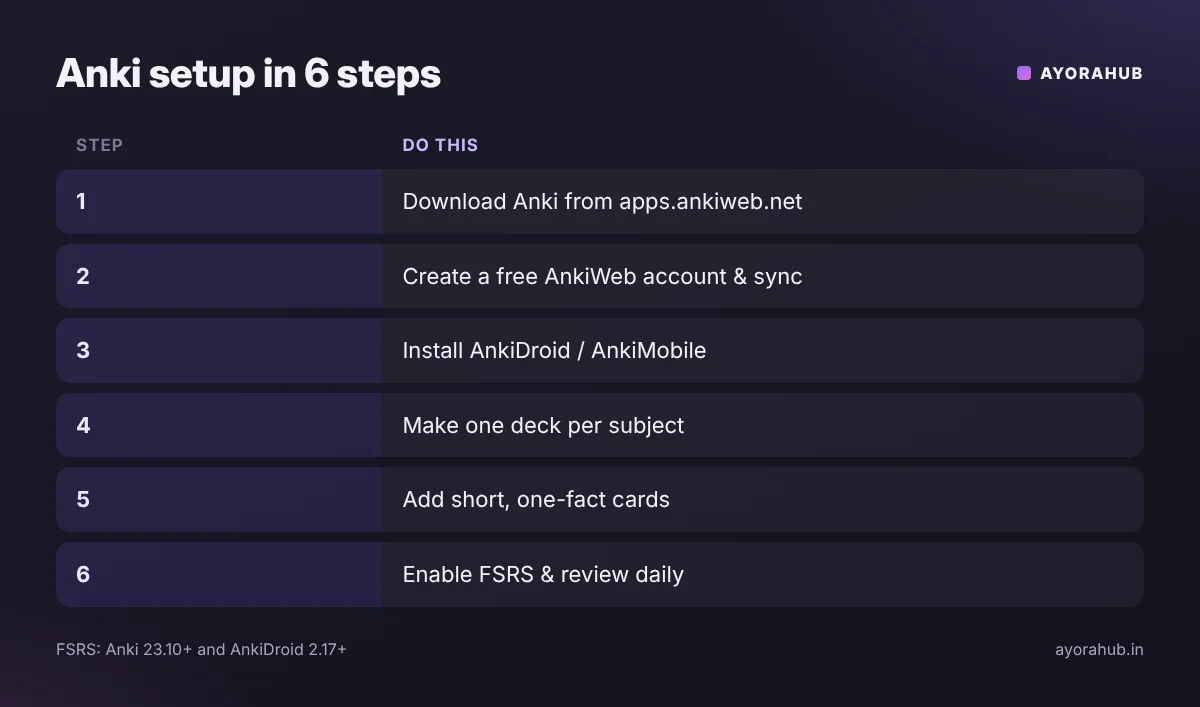
- Download Anki from apps.ankiweb.net and install it.
- Create a free AnkiWeb account and click Sync in the app.
- Install AnkiDroid (Android) or AnkiMobile (iPhone) and log in to the same account so reviews sync.
- Create a deck for each subject (for example “Biology – Cell”, “Spanish – Verbs”).
- Add cards with Add → choose a note type → type the front and back.
- Turn on FSRS: open a deck’s Options → enable FSRS. It needs Anki 23.10+ on desktop and AnkiMobile, and AnkiDroid 2.17+. FSRS is a global setting, so update all your devices first.
- Study every day — click the deck and press Study Now.
How to make good Anki cards
- One fact per card. “What are the 4 functions of the liver?” is hard to grade; split it into four cards.
- Understand first, memorise second. Make cards after you learn a topic, not instead of learning it.
- Use cloze deletions for definitions and lists: “The powerhouse of the cell is the {{c1::mitochondria}}.”
- Add images and diagrams — especially for anatomy, maps and chemistry structures.
- Write in your own words and keep answers short.
- For languages: put the word in a sentence and add audio.
Card types at a glance
| Note type | Best for | Example |
|---|---|---|
| Basic | Question → answer | Capital of Australia? → Canberra |
| Basic (and reversed) | Vocabulary both ways | “perro” ↔ “dog” |
| Cloze | Definitions, formulas, lists | F = {{c1::m × a}} |
| Image occlusion | Diagrams, maps, anatomy | Hide labels on a heart diagram |
A daily Anki routine that works
- Do reviews first, every day, before new cards — skipping days builds a backlog.
- Add new cards in small, steady amounts (for example 10–20 a day). Each new card creates future reviews.
- Be honest with ratings — press “Again” if you didn’t know it.
- Fix or delete “leech” cards you keep failing; they are usually badly written.
- Sync at the end so your phone and computer match.
Using AI and shared decks
- Shared decks on AnkiWeb can save time, but check their accuracy and match them to your syllabus.
- AI chatbots such as ChatGPT or Claude can turn your notes into draft question-answer pairs. Always verify facts against your textbook before importing — AI can be wrong.
- More study tools: best AI tools for students.
Advantages and limitations
| Advantages | Limitations |
|---|---|
| Free on desktop, web and Android | iPhone app is paid |
| Proven method: active recall and spacing | Old-fashioned interface; a learning curve |
| Fully customisable; add-ons on desktop | Reviews pile up if you skip days |
| Works offline and syncs free | Memorisation is not understanding — still practise problems |
Common mistakes
- Adding hundreds of cards in one day, then quitting when reviews explode.
- Long, multi-fact cards.
- Using only shared decks you never studied from.
- Mixing FSRS-capable and outdated apps on different devices.
Frequently Asked Questions
Is Anki free?
Yes on Windows, Mac, Linux, the web (AnkiWeb) and Android (AnkiDroid). The iPhone/iPad app AnkiMobile is a one-time paid app.
What is FSRS in Anki?
FSRS (Free Spaced Repetition Scheduler) is a modern scheduling algorithm and an alternative to Anki’s older SM-2 algorithm. It is supported from Anki 23.10 and AnkiDroid 2.17.
How many new Anki cards should I add per day?
Start small, such as 10–20, and adjust based on how much daily review time you have.
Is Anki good for NEET, JEE or UPSC?
Yes for facts you must remember — formulas, reactions, dates, definitions, current affairs — alongside practice questions and mock tests.
Why is AnkiMobile paid when AnkiDroid is free?
Anki’s official FAQ explains that AnkiMobile’s sales fund Anki’s development, while AnkiDroid is made by a separate volunteer group.
Can I use Anki without the internet?
Yes. Study offline and sync when you are back online.
Conclusion
Anki rewards consistency: a few focused minutes every day beat long cramming sessions. Make short cards, review daily, turn on FSRS and keep new cards steady. Next, upgrade the rest of your study toolkit with AI tools for students, and if you are learning to code, see how to learn programming.
How we researched this
We used Anki’s official website and manual, its official FAQs on algorithms and pricing, and the App Store listing for AnkiMobile, checked in November 2026. App Store prices differ by country.